- Residential purchases and sales on the Law Society contract
- Torrens title and strata lots
- Cooling off worked out in business days from exchange
- Completion date from the contract and its special conditions
- Transfer duty calculated, including the duty due date
- Section 10.7 planning certificates and section 184 strata certificates recognised
- Requisitions on title and the requisitions deadline
- Settlement adjustments for council rates, water and strata levies
- PEXA and InfoTrack, added as each connection is released
Law, done automatically.
Conveyancing software that runs your files automatically
Lawtic reads the contract and searches, fills in the matter, calculates cooling off and completion, prepares the settlement adjustments and drafts the next letter. You check it, approve it and send it. Built and tested on real files in a working NSW property law practice.
Per file. No subscription. Whole team free. Pass it on as a disbursement.
Already have an account? Sign in
AI conveyancing automation
Conveyancing automation that takes the admin off every file
Typing up the contract, filing searches and diarising dates eats hours on every file. Lawtic does that work from the documents you already have, so your team spends its time on advice.
What Lawtic does
- Contract and search review, filled into the matter
- Every document filed in order on the matter
- Cooling off, completion and other key dates
- Settlement adjustments with the workings shown
- Letters and requisitions, filled in from the matter
- Tasks, reminders and chasers
- E-signing and client intake forms
Best fit: firms running residential conveyancing who want to take on more files without adding staff.

Sound familiar?
The problems conveyancers raise most, and how Lawtic answers them
- Hard to hand a file to someone elseEvery matter shows its stage, what is done and what is next, so anyone in your team can pick it up without a handover.
- Too many systems to keep in stepLawtic works with your practice management system and saves back to the matter there, so there is no second set of records.
- Clients pushing back on feesTake on more files with the team you have, and pass the Lawtic fee on as a disbursement.
- Long days and stretched staffThe typing, filing, diarising and first drafts are done before anyone opens the file.
- Know-how walks out the doorYour process lives in each matter's stages, not in one person's head, so a new starter follows the same steps.
- Not sure AI can be trustedEvery figure links to the document it came from, anything uncertain is flagged, and nothing leaves your office until you have checked it.
Law, done automatically
Every file moves to its next stage automatically
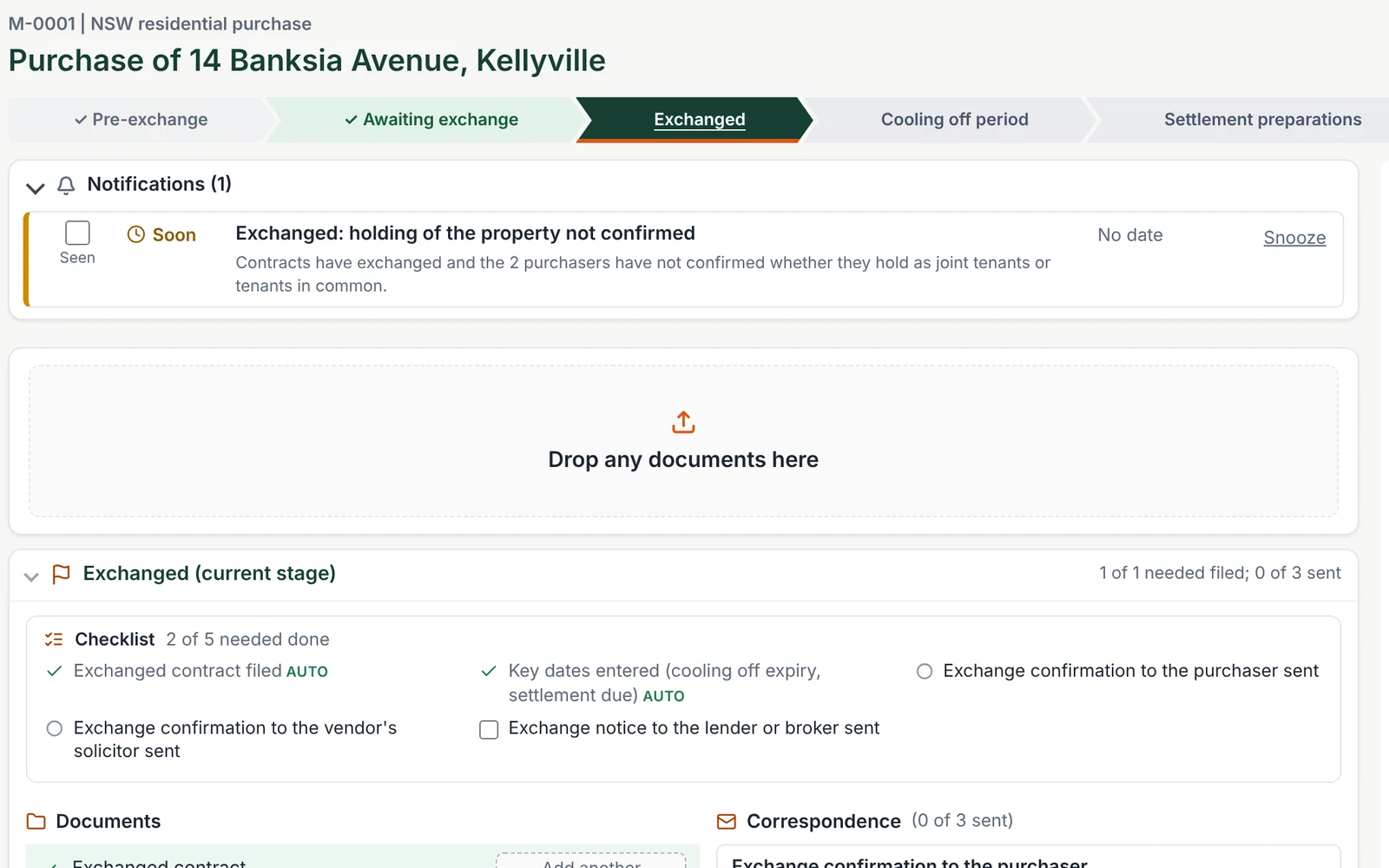
No more opening a file to work out where it is up to. Lawtic follows each matter through its stages, from pre-exchange to settlement, and moves it on when the file shows that a stage is done.
What an overdue task can really mean
On a task list that relies on someone ticking things off, an overdue task could mean any of these:
- It has not been done
- It was done, but nobody ticked it off
- It is genuinely outstanding and needs chasing
- It does not apply to this file, and just needs closing
So someone has to open the file to find out which.
How Lawtic knows instead
Lawtic looks at what is actually on the file. For example, when the exchanged contract arrives, Lawtic files it, moves the matter to Exchanged, works out the cooling off expiry and the completion date, and has the exchange letters ready to send. Nobody has to remember to tick “contracts exchanged”.
When something has not happened, Lawtic tells you exactly what, so an alert always means something needs doing.
Lawtic adds this to the practice management system you already use. Your matters stay there, and Lawtic keeps them moving.
How it works
From contract to settlement, each stage set up for you
Lawtic flags anything it is not sure of, and nothing leaves your office until you have checked it.
Open the matter in minutes, not hours
Drop in the contract and Lawtic reads it: the parties, the property, the price, the deposit and the special conditions are filled in on the matter for you to check.
Every document recognised and filed
Lawtic knows the exchanged contract from the draft, and a strata report from a section 184 certificate. Each document is filed on the right matter, and anything uncertain is flagged for a person to check.
Key dates worked out under the contract
Cooling off, completion and notice dates are calculated from the contract and the exchange date, with reminders set, so nothing is missed.
The file moves itself to the next stage
When the documents show a stage is done, the matter moves on: the searches to order are ready, the adjustment sheet is prepared once the searches are in, and the stage's tasks are set.
Letters and requisitions ready to send
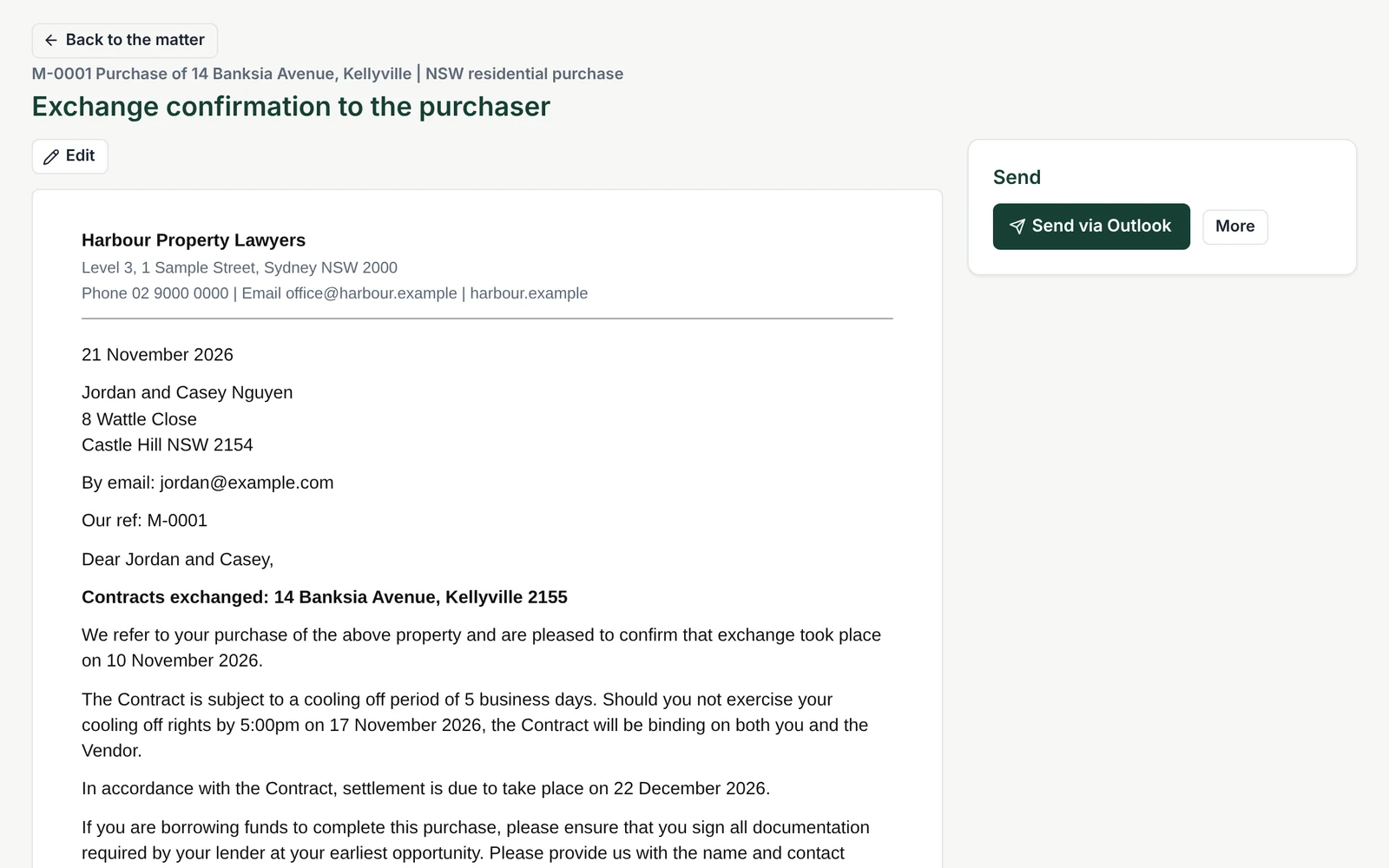
The next letter opens already filled in from the matter. Edit it, save it as Word and PDF, and send it from Outlook in one click.
Settlement adjustments with the workings
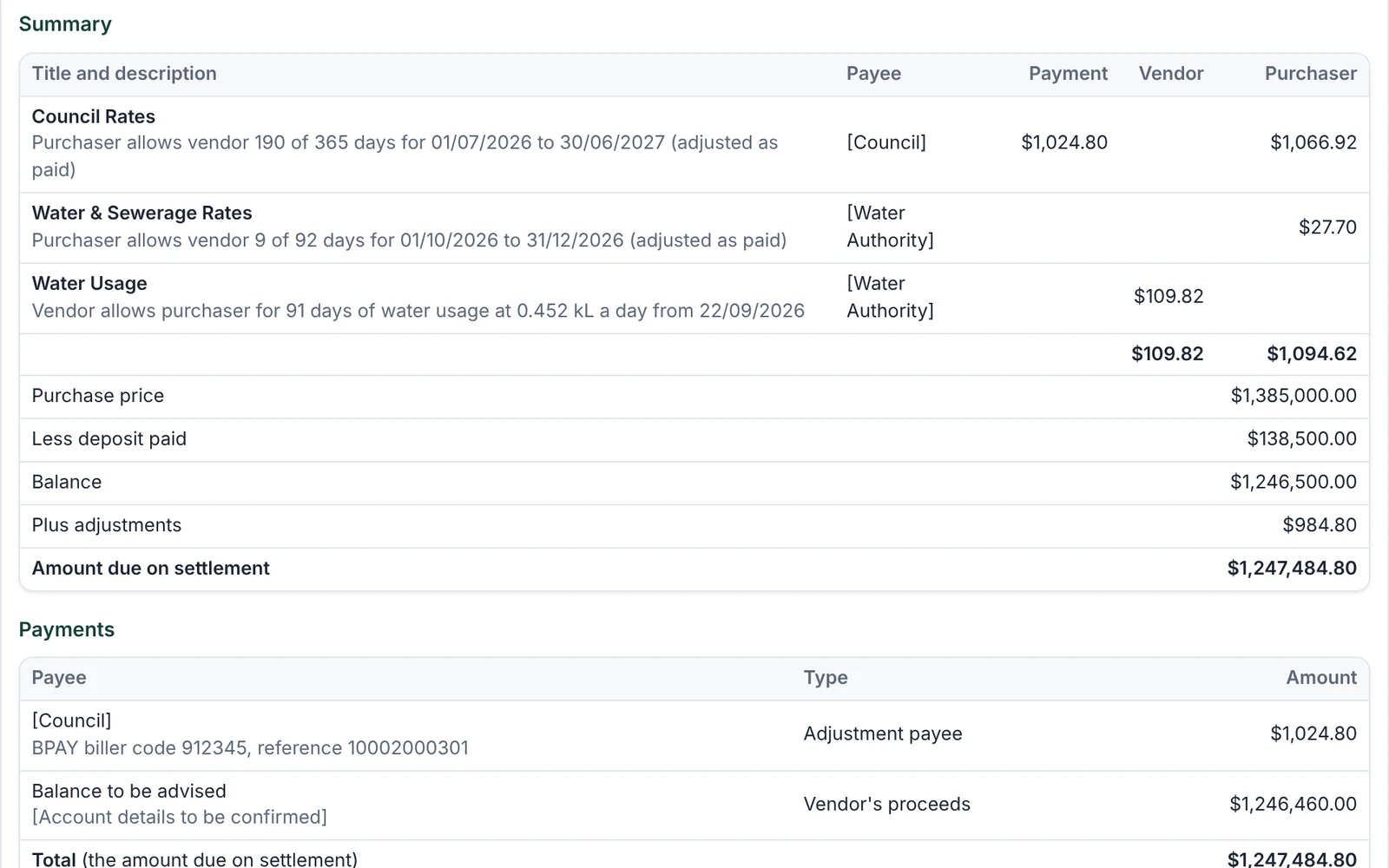
Council rates, water and strata levies are apportioned from the notices on file, with each figure linked to the notice it came from, ready for you to check.
When the next stage includes a letter
- Edit in Lawtic: the letter opens on the matter, already filled in.
- Save to the matter: as Word and PDF, straight back to the matter in your practice management system.
- Send your way: Send via Outlook attaches it to an email in your Outlook in one click, ready for you to send.

Built for NSW conveyancing
NSW conveyancing software that knows the NSW contract
Other states, sooner than you think
Victoria, Queensland and the other states are on the way, and sooner than you might expect. Register your interest and you will be the first to know when Lawtic launches in your state.
Register your interest
Why firms choose Lawtic
Take on more files without adding staff
- Built inside a working property law practice: Designed around how NSW conveyancing files actually run, and used daily on live files.
- Works with your practice management system: Your practice management system stays the home of your matters, contacts, trust, time and billing. Lawtic adds the automation for your conveyancing files and saves everything back to the matter there.
- Pay per file: No subscription and no lock-in. The fee can be passed on as a disbursement.
- Your whole team, free: Add every lawyer, conveyancer and assistant at no extra cost. There is nothing to install.
Pricing
Per file, no subscription, whole team free
You pay only for the files Lawtic works on, and you can pass the fee on to your client as a disbursement, so it costs your firm nothing to run. Book a demo for current pricing and launch pricing for early firms.
- Pay only when it settlesCharged once per file, when it settles. Files that fall over before exchange are free. Billed monthly and itemised by matter.
- No subscriptionNo setup fee, no lock-in. Stop any time.
- Your whole team, freeAdd every lawyer, conveyancer and assistant at no extra cost, plus a view-only login for your accountant.
- Pass it on as a disbursementList the fee in your costs disclosure, so Lawtic costs your firm nothing to run.
FAQs
Conveyancing software questions, answered
What is Lawtic?
Lawtic is AI conveyancing software for Australian law firms and licensed conveyancers. It reads the contract and searches, fills in the matter, works out the key dates, prepares settlement adjustments and gets each stage of the file ready, so your team spends its time checking and advising rather than typing.
Is Lawtic a practice management system?
No. Lawtic works alongside the practice management system you already use. Your matters, contacts, trust accounting, time recording and billing stay there, and Lawtic adds the automation for your conveyancing files, saving documents and details back to the matter in your system.
Does Lawtic cover commercial property?
Lawtic covers residential purchases and sales today. Commercial property, transfers and leasing are being added, so a firm can run all of its property work in Lawtic.
Which states does Lawtic cover?
Lawtic is available now in New South Wales, with other states on the way. If you practise in another state, register your interest and we will let you know first when your state opens.
How does Lawtic use AI?
AI reads and recognises the documents on a matter, such as the contract, title search and strata report, and fills in the details. Anything it is not sure about is flagged for a person to check. You stay responsible for the advice and every decision on the file. Lawtic does the reading, filing and preparation.
Does Lawtic calculate settlement adjustments?
Yes. Lawtic prepares the adjustment sheet for council rates, water and strata levies from the notices on file, with the workings shown and each figure linked to the notice it came from, ready for you to check.
How is Lawtic priced?
Lawtic is charged per file, with no subscription and no lock-in. A file is charged only when it settles (files that fall over before exchange are free), and the fee is billed monthly in arrears, itemised by matter, so you can list it as a disbursement in your costs disclosure. Book a demo for current pricing and launch pricing for early firms.
Does Lawtic work with PEXA and InfoTrack?
PEXA and InfoTrack connections are being built and will be added to Lawtic as each one is released.
Can licensed conveyancers use Lawtic?
Yes. Lawtic is built for both law practices and licensed conveyancers.
How long does it take to get started?
Create a firm account and you can open your first matter the same day. There is nothing to install and no setup fee. We will walk you through a live matter in the demo.
Guides
See how it works, in plain English
All guides- How documents are filed on the matterEvery document lands in the right place on the right matter, and anything uncertain is flagged for a person to check.Read the guide
- From document to next stage: how a matter movesThe documents on file move the matter on, work out the dates and get the next stage ready.Read the guide
- Letters: edit, save to the matter, sendThe next letter opens in Lawtic, filled in from the matter. Edit it, save it as Word and PDF, then send it your way.Read the guide
- Settlement adjustments and the workingsNSW settlement adjustments with every figure shown, linked to the notice it came from, and approved by a lawyer.Read the guide
See it run one of your files
Book a 30 minute demo and we will take a NSW matter from contract to settlement in front of you.